Design ID cards & badges.
Personalize hundreds. Print in minutes.
KadiFasta is a desktop card designer with a real drag-and-drop canvas, an AI assistant that edits your design from a prompt, and bulk generation that turns a spreadsheet into a stack of finished, print-ready cards.
Free to download · every feature unlocked · watermark-free exports with a license

KadiFasta helps schools, event organizers, and businesses design and print ID cards and badges that look professional every time. Build a card once on a precise, print-accurate canvas, or describe it to the built-in AI assistant and let it edit the design for you, then bring in your recipients from a spreadsheet, a SQL database, or direct entry — with photos and signatures imported or captured live from a camera — to turn a single template into a stack of hundreds of finished, print-ready cards.
Excel, SQL database or direct entry
Capture photos & signatures by camera
Automatic bulk personalization
Paper-saving print layouts
KadiFasta Design Software Features
AI Design Assistant
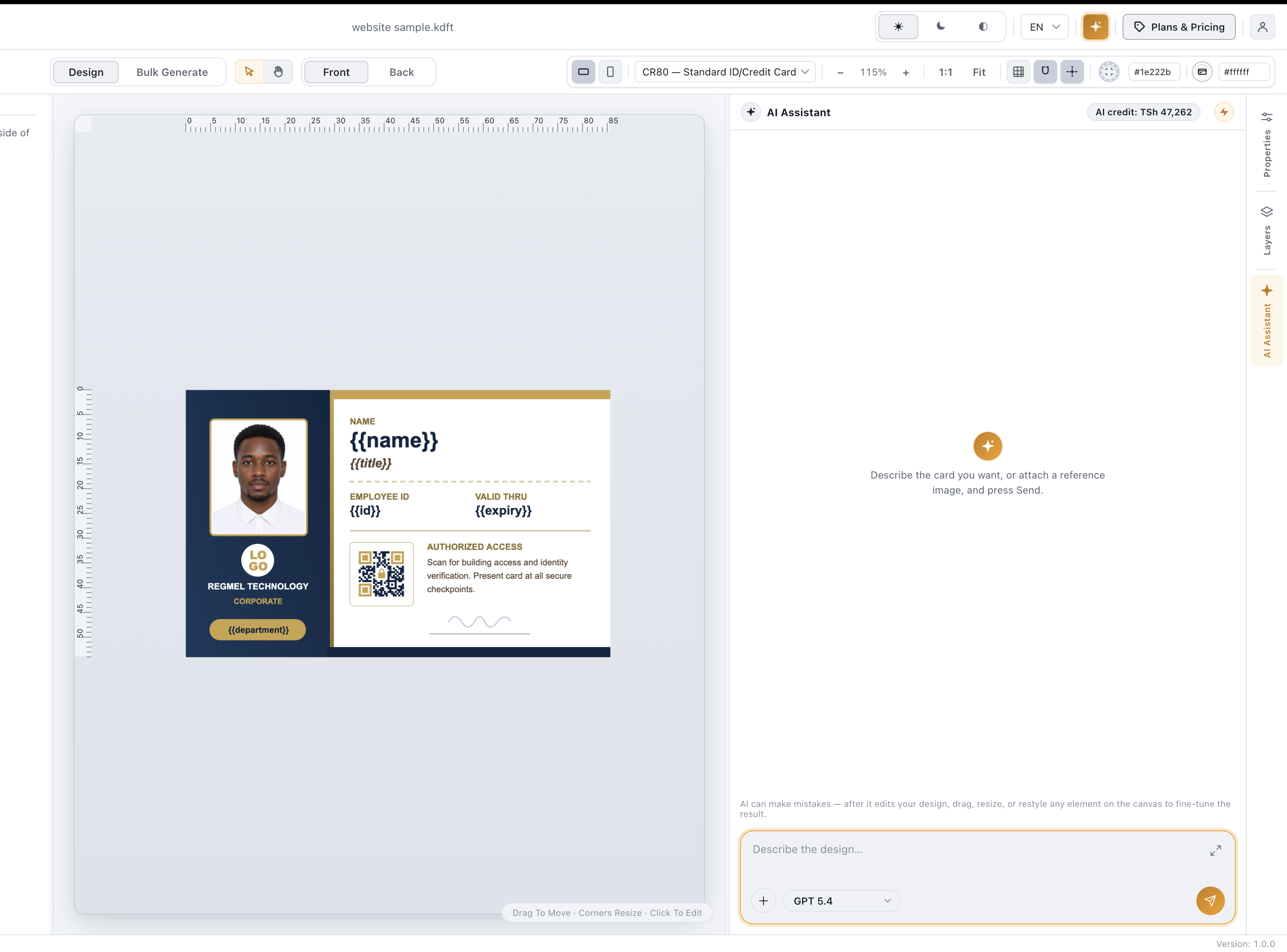
Describe it, and the assistant designs or edits your card
The built-in AI assistant understands your current design and can generate a brand-new card from scratch or edit what's already on the canvas, all from a plain-language prompt or an attached reference image for style guidance.
- Chat-style prompt panel docked to the canvas
- Generates a brand-new design or edits what's on the canvas
- Attach a reference image for style guidance
- Works with a prepaid AI credit wallet, billed per use
Design canvas
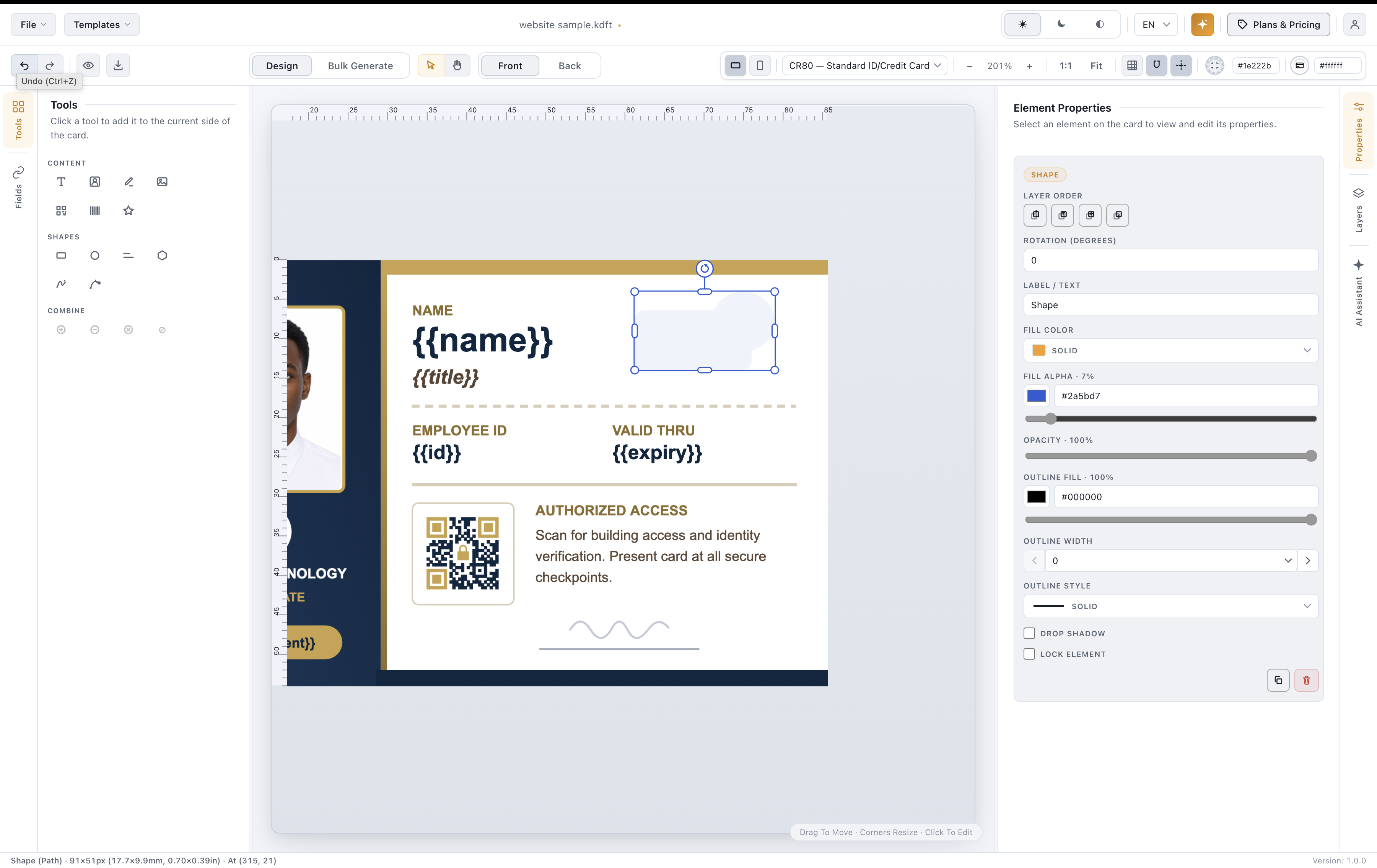
A precise, print-accurate canvas
Add text, photo boxes, signature boxes, static images, and shapes — rectangles, circles, lines, polygons, freehand paths, and a full Bezier pen with click-drag curve handles. Combine shapes with union, subtract, intersect, and combine operations. Cards are sized in real millimeters or inches, front and back, in landscape or portrait.
- Text, photo, signature & static image elements
- Rectangle, circle, line, polygon, path & Bezier pen
- Boolean union / subtract / intersect / combine
- Custom card sizes in mm or inches, front & back
Data sources & bulk generation
Any data source in, a stack of finished cards out
Use the data you already have — import an Excel (.xlsx/.xls) or CSV file, connect directly to a SQL database, or type records in by hand — and KadiFasta merges each record's name, ID number, and other fields into your template, photos and signatures included, with automatic face-cropping and background cleanup applied across the whole batch. Preview any record with sample data before committing to a full run of hundreds of cards.
- Import recipients from Excel (.xlsx/.xls) or CSV
- Connect directly to a SQL database
- Type records in directly — no spreadsheet needed
- Per-record photo & signature merge
- Automatic face-crop & background cleanup, batch-wide
- Sample-data preview before a full run
Photo & signature capture
Passport-ready photos and clean signatures, automatically
Bring images in however suits you — pick a file, merge them from your data source, or capture a photo or signature on the spot with a connected camera or webcam. Every photo box comes with a built-in editor: detect the face and auto-crop to a passport-style headshot, cut out the background and drop in a solid ID-blue, white, transparent, or custom color, and clean up a scanned or captured signature so only the ink shows, not the paper. Fine-tune any of it by hand afterward, or let it run automatically across an entire bulk-generation batch.
- Capture photos & signatures live from a connected camera or webcam
- Automatic face-crop to a passport-style headshot
- Background removal, filled with a solid color or transparency
- Scanned- or captured-signature cleanup, ink only — no paper background
- Applies across a full bulk-generation batch, not just one photo
Printing & export
From canvas to a printed sheet
Export a single card as a PNG, or export a full batch as a print-ready PDF automatically laid out in a grid that fits as many cards as possible per sheet — matched to your exact card size.
- PNG export for single cards
- PDF export with automatic print-grid layout
- Native printer discovery from the desktop app
Templates & marketplace
Start from a template, or build your own catalog
Save any design as a reusable template, export/import it as a portable .idct file to share across a team, or browse the KadiFasta marketplace to buy ready-made designs from other creators.
- Save, load, export & import templates (.idct)
- Portable .idcp project files bundle assets with the design
- Marketplace to buy or sell templates
Get KadiFasta and start designing
Download free and try every feature, issue your first cards in minutes.
Trusted by teams around the world
Used by schools, event organizers, and businesses to issue cards & badges
Testimonials
What customers say
Early feedback from teams using KadiFasta to badge their staff, students and guests.
“We went from a spreadsheet and a laminator to printing 400 student cards in an afternoon.”
Amina R.
School registrar
“The bulk import just works — I map my columns once and reuse the template every term.”
Joseph M.
HR officer
“Offline mode saved us during an event with no signal at the venue — cards kept printing.”
Grace K.
Events coordinator
Specifications
Standard sizes
What you can create
- ID cards & staff badges
- Event & conference badges
- Membership & loyalty cards
- Student ID cards
- Access & visitor passes
- Name tags
- Windows 10/11 or macOS 12+
- 4 GB RAM minimum, 8 GB recommended
- 500 MB free disk space
- Any Windows/macOS-compatible printer
- Internet for AI assistant & activation
- Offline grace period once activated
Create and print high-quality ID cards with KadiFasta
Download free, no credit card required. Every feature is unlocked; add a license anytime to remove the export watermark.